Summary
| Foundation Year | 2018 |
| Country | 🇺🇸 United States |
| Founders | Gauge team |
| Tier | 100% Free |
| Platforms | API, Web Browsers |
| AI Features | API, Browser automation, Cross-browser testing, Cross-platform testing |
| Pricing From | Free Forever |
| Support | N/A |
| Best Used For | AI Browsing Automation |
| Affiliate Program | No |
| White Label | No |
| API | Yes |
Gallery
Description
Features
- Easy installation / easy setup
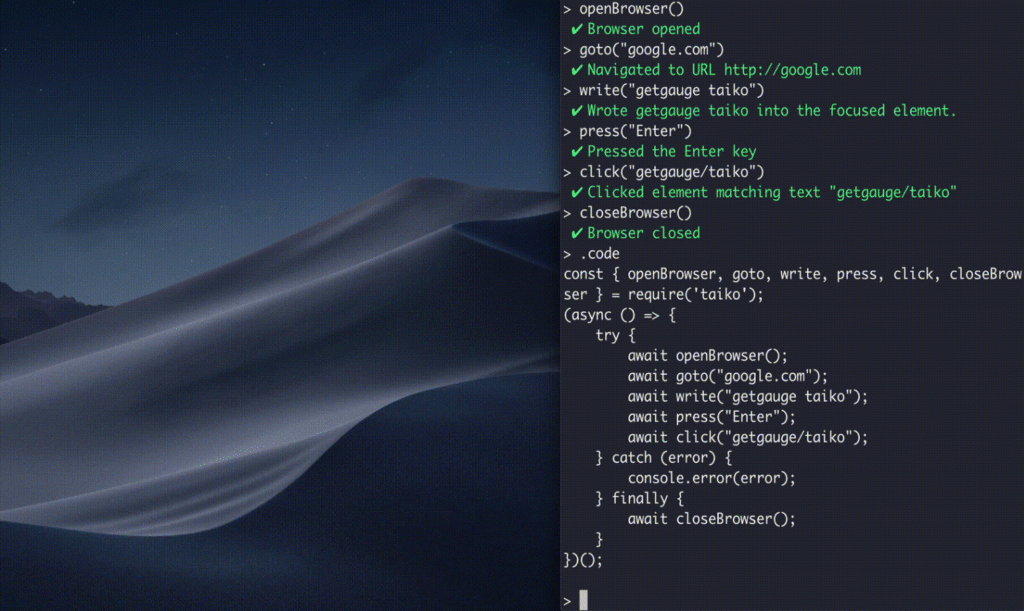
- Interactive Recorder (REPL)
- Smart selectors
- Implicit waits / handle XHR and dynamic content
- Request/Response stubbing and mocking
- Cross-browser automation for Chromium-based browsers and Firefox
- Screenshots
- Assertions
- File upload and download
- Working with element lists
- Integrations with test runners (e.g. Gauge, Jest, Jasmine)
- Configurable runtime / Taiko configuration
- Plugin architecture (writing and using plugins)
- Community plugins (accessibility, Android, diagnostics, screencast, storage, screenshots, video, etc.)
- Running scripts inside the browser
- Taiko in Docker
- Experimental Firefox support
- Experimental TypeScript support
Free Plan & Pricing
No paid plan available for Taiko
Refund Policy
5 Ratings
[N/A]
[N/A]
5app.ai Rating
[N/A]
AI Review
[4.2/5]
Taiko is a reliable and cost-effective browser automation tool that prioritizes test stability over extreme speed. It offers excellent implicit wait mechanisms that reduce flaky tests, works seamlessly with the Node.js ecosystem and JavaScript-based frameworks like React and Angular, and can automate any browser functionality. The tool is particularly valued for providing fast and reliable feedback that improves developer productivity, though it requires JavaScript knowledge and may need performance optimization in some scenarios.
Sources:- Gauge.org, Dev.to
Our Expert's Opinion
[4/5]
After using many browser test tools, Taiko feels simple and easy to read, and I like how the smart selectors and implicit waits remove a lot of flaky tests for modern web apps. The REPL recorder is also very helpful, because I can try commands in the terminal and see the browser react right away, then copy the code into my tests. But Taiko is not perfect: it only works with Node.js and JavaScript, so I cannot use it in teams that prefer Java, Python, or C#, and the community and ecosystem feel smaller than tools like Selenium or Playwright, so answers and plugins are harder to find. Browser support is strong for Chromium, while Firefox support is still marked as experimental and has some known issues, so I am careful before using it in big cross-browser test suites. On very complex or heavy pages it can also feel a bit slower or less smooth than the most mature tools, and it still misses some advanced features and integrations I get out of the box elsewhere, but overall I see it as a nice, focused option when my project is JavaScript-first and mainly on Chromium.
Videos
User Reviews - 0 reviews
Reviews
Write a ReviewThere are no reviews yet.