Summary

Pro Tip: You can click on the green text to discover more matching apps!
Foundation Year2019
Country🇵🇱 Poland
FoundersPaweł
TierFree Trial, Freemium, Paid
PlatformsAPI, Web Browsers
AI FeaturesAPI, Automatic Selectors, Browser automation, Cloud Test Scheduling, Codeless Test Recorder, Reusable Components, Unlimited Local Test Runs
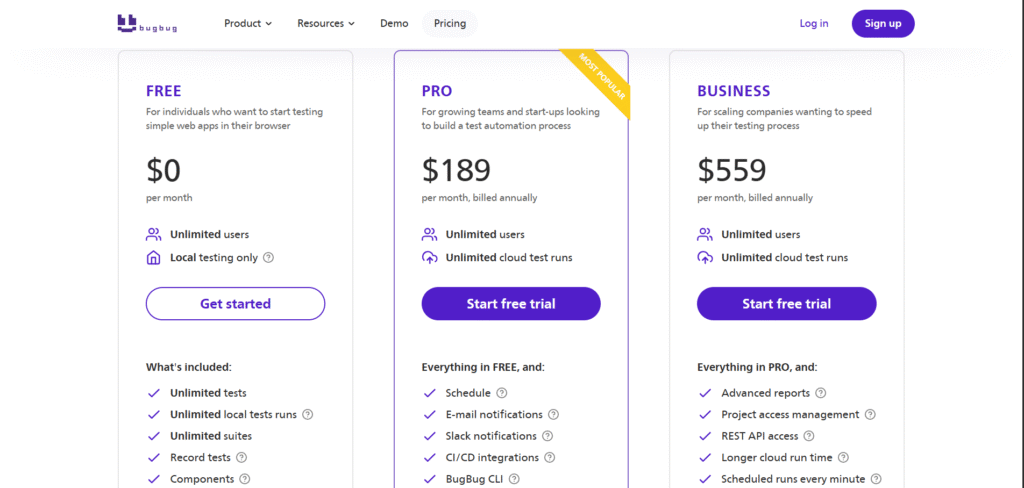
Pricing From$189 Per Month
SupportYes (Email)
Best Used ForAI Browser Automation
Affiliate ProgramNo
White LabelNo
APIYes

Description

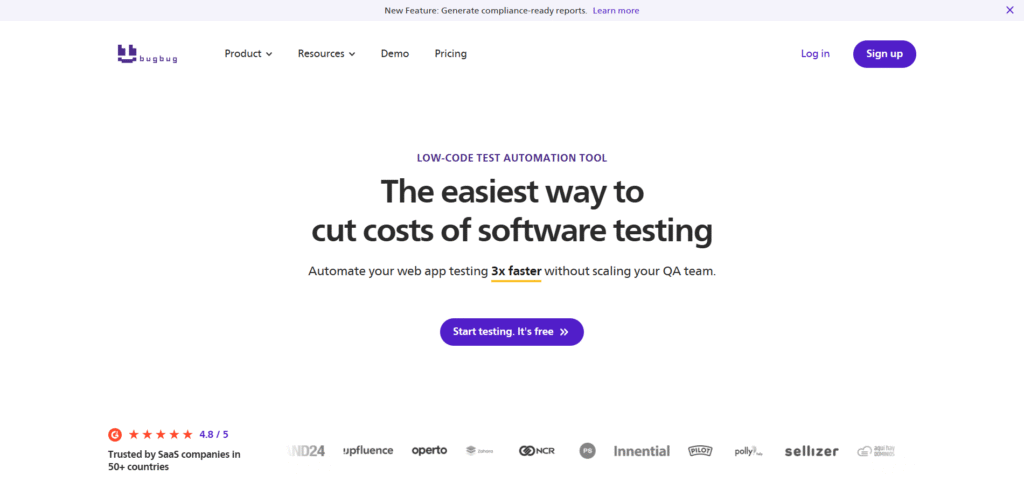
BugBug is a codeless test automation tool that lets you create and run browser tests for your web app in just a few clicks, without writing code. Using a Chrome extension, you simply click around your site and BugBug records every action, then you can Edit & Rewind any step to fix or extend tests fast. It gives you unlimited local test runs on the free plan, with screenshots, smart waiting, and automatic selectors so tests stay stable even when the UI changes. When you are ready to scale, you can run tests in the cloud, schedule them to run every day, and plug BugBug into your CI/CD pipeline (GitHub, GitLab, Jenkins and more) so your checks run on every deployment. Teams like it because the interface is very simple, so developers, QA and product people can all work together on tests in one place.

Features

  • Codeless Test Recorder
  • Edit & Rewind
  • Unlimited Local Test Runs
  • Cloud Test Scheduling
  • CI/CD Integrations (API & CLI)
  • Reusable Components
  • Variables & Conditions
  • Automatic Selectors
  • Smart Waiting
  • Testing Inbox (Built-in Email Testing)

Free Plan & Pricing

Free Tier
Free
Unlimited tests
Unlimited local tests runs
Run tests in your own browser without limits.
Unlimited suites
Record tests
Use the BugBug Chrome Extension to record tests effortlessly—just click in your browser, and it will automatically capture every test step.
Components
Components are groups of steps that are shared across multiple tests. Use components to easily edit multiple tests at once.
Edit & rewind
Edit steps in the middle of your test and start the execution from any given position, bypassing the need to wait for earlier steps to complete.
Smart waiting conditions
Before running each test step, BugBug will do a series of checks if your page is ready for a specific action.
Screenshots
BugBug takes a full-size screenshot for every action.
7 days of tests history
Free Trial
Limited Access
Paid Plans
Pro ($189 Per Month)
Schedule
Monitor your website and stay confident it works as it should.
E-mail notifications
Get notifications when tests on schedule failed.
Slack notifications
Get real-time, detailed updates on test runs, suite executions, or scheduled runs in your Slack messages.
CI/CD integrations
Integrate with GitHub, GitLab, Bitbucket Pipelines, etc.
BugBug CLI
Integrate with any CI/CD pipeline using BugBug Command Line Interface.
Custom JavaScript steps
Perform any function during your tests with the power and flexibility of custom code actions.
Webhooks
Integrate BugBug into your current workflow, for example by sending notifications to your team's communicator, such as Slack.
Variables & Profiles
Handle advanced testing scenarios, create your own presets for different variable values, work on multiple environments, generate unique user emails, etc.
Inbox for e-mail testing
Use the BugBug inbox feature for user registration and login tests. Generate a unique email address, receive the email with the verification link.
Console logs
Easily identify test issues by collecting browser console logs along with debug logs from the BugBug Chrome extension.
Standard reports
Download PDF reports with key insights - including test run summaries for each suite and overall results.
1 month of tests history
Priority customer support
Priority support from our test automation experts - real people, no bots.
Optional parallel runs
Business ($559 Per Month)
Advanced reports
Download detailed, compliance-ready reports - including PDF reports with step-by-step screenshots. Export your data in multiple formats including JSON, CSV, and more.
Project access management
Assign user roles to projects and control access levels for each role within your projects.
REST API access
Run tests and suites in the cloud using BugBug's public API.
Longer cloud run time
A single cloud test can run for up to 30 minutes.
Scheduled runs every minute
Test run frequency can be scheduled as frequently as every 1 minute.
2 months of tests history
Premium customer support
Refund Policy
BugBug does not offer any kind of partial or full refunds on their subscriptions.

5 Ratings

[4.8/5]

[N/A]

5app.ai Rating

[N/A]

AI Review

[4.7/5]

BugBug.io is praised for its ease of use, intuitive interface, and generous free plan. Users appreciate the no-code approach, seamless CI/CD integration, and responsive support. The tool is ideal for teams wanting to automate web testing without writing code, though it currently only supports Chromium-based browsers.
Sources:- Softwareadvice.co.uk, Softwaretestingmaterial.com, Capterra.com, Softwaretestinghelp.com, G2.com, Bugbug.io, Thectoclub.com, Chromewebstore.google.com

Last Fetched Date: November 21, 2025, 6:35 am
Our Expert's Opinion

[4/5]

After trying BugBug on a few real projects, it feels like a very friendly tool for simple and medium web tests: the recorder is easy, the UI is clean, and people with little or no coding can start making tests quite fast, which matches what many users say about its ease of use and quick setup. I like that you can run tests in the cloud, plug it into CI/CD, and use features like Edit & Rewind, smart waits, and email testing, so it can really save time after each deployment. But it is not perfect: some reviewers still report missing or weaker “power user” features, occasional bugs, and say that for very complex applications you may hit limits faster than with tools like full Playwright/Cypress setups. Also, support is mainly via email and advanced workflows (large suites, very custom logic) can feel a bit constrained compared to pure code-based frameworks. So overall, BugBug is great if you want fast, simple browser tests with low setup, but heavy automation teams may still want to combine it with more traditional, code-first tools.

Videos

No Videos Available.

User Reviews - 0 reviews

Overall Rating: 0

Reviews

Write a Review

There are no reviews yet.

Leave a Review

Your email address will not be published. Required fields are marked *